
SAP VIM Menu: In OpenText Vendor Invoice Management solution for SAP, SAP VIM offers a complete SAP VIM Menu with all relevants shortcuts to SAP VIM Tcodes.
In this post, The SAP VIM Menu will be detail.
Refer to these posts for more detail about SAP VIM
SAP VIM Menu Tcodes
DP Document
This section regroups all relevant actions for DP document and shorcuts to testing programs for OCR and non OCR scenario :
[table tablesorter=”o” class=”table table-border”]
VIM Functionality, Tcodes, Description
DP Document, /OPT/VIM_7AX8, ICC Admin Tool
DP Document, /OPT/VIM_1AX13, Display DP Document
DP Document, /OPT/VIM_7AX1, Non?OCR Scenario
DP Document, /OPT/VIM_7AX2, OCR Scenario
[/table]
Roles
This section helps managing VIM agent and SAP user. There are Roles and Organization maintenance SAP tcodes shortcuts.
[table tablesorter=”o” class=”table table-border”]
Topic, SubTopic, Tcodes, Description
Roles,,/OPT/CP_T914 ,Link Product code and Object type
Roles,,/OPT/CP_9CX2 ,Template Maintenance
Roles,,/OPT/CP_9CX5, Role Maintenance
Roles,,/OPT/CP_9CX4,Simple Mode Role Maintenance
Roles,,/PTGWFI/ORG, Org Maintenance Utility
Roles,,/OPT/CP_9CX10 ,Fail_Safe Role Maintenance
Roles,,/OPT/VIM_ROLETEST ,Role Test Utility
Roles, Invoice Approvals, /OPT/VIM_7CX1, Chart of Authority Maintenance
Roles, Invoice Approvals, /OPT/BL_APR_CONF ,Coder/Approver Options Configuration
[/table]
Check also this post about?Retrieve SAP VIM Default Approval from the Cost Center?based on SAP VIM Roles.
WF Admininstration
This section is for Workflow Administation important SAP VIM tcodes
[table tablesorter=”o” class=”table table-border”]
Topic, Tcodes, Description
WF,/ORS/UMREASSIGNED, Reassignment Utility
WF,SWI1, Workflow Log
WF,/OPT/REMINDER, Reminders Program
WF,/PTGWFI/M_LANG, WI text update Utility
WF,SM30, General Global Customizing settings
[/table]
Runtime Tools
This SAP VIM Area covers Vim Runtine Tools
[table tablesorter=”o” class=”table table-border”]
Topic, ?Tcodes, Description
Runtime, /OPT/VIM_ROLETEST, Role Test Utility
Runtime, /OPT/VIM_TEST_ACTION?,Process option Test Utility
[/table]
Reports
Within the most important SAP VIM functionnality is the Reporting.
The most important tcodes for Reporting in Vendor Invoice Management are:
/OPT/VIM_ANALYTICS and?/OPT/VIM_IIC.?
SAP VIM OpenText offers two kind of reporting:
Periodic Processing
For Periodic Processing in OpenText VIM, check the following SAP Tcodes
[table tablesorter=”o” class=”table table-border”]
Topic, ?Frequency, Tcodes, Description
Periodic, Year End Run,/OPT/VIM_YEND_PO, Year End Report Run
Periodic, Year End Run,/OPT/VIM_YEND_NPO ,Year End Report Run
Periodic, Year End Run,/OPT/VIM_YEND_LOG, Year End Run Log
Periodic, Month End Run ,/OPT/VIM_MEND_PO,?Month End Report Run
Periodic, Month End Run ,/OPT/VIM_MEND_NPO, Month End Report Run
Periodic,,/OPT/VIM_ANALYTICS?,VIM Analytics
Periodic,,/OPT/VAN_LIABILITY?,Current Liability Report
[/table]
Central Reporting
[table tablesorter=”o” class=”table table-border”]
Topic, Tcodes, Description
Central Reporting , /OPT/VIM_IIC ,Integrated Invoice Cockpit
Central Reporting , /OPT/VIM_AGING ,Aging Report
Central Reporting , /OPT/VIM_SUMM ,Summary Report
Central Reporting , /OPT/VIM_AUDIT ,Audit Report
Central Reporting , /OPT/VIM_EXCP1 ,Exception Analysis Report
Central Reporting , /OPT/VIM_KPA1 ,Key Process Analytics
Central Reporting , /OPT/VIM_LICENSE ,License Report
Central Reporting , /OPT/VIM_PROD1 ,Productivity Report
[/table]
check?How to Extend Integrated Invoice SAP VIM Integrated Invoice Cockpit
Customization
This SAP VIM Menu section regroups all SAP Tcodes for OpenText Customizing:
[table tablesorter=”o” class=”table table-border”]
Topic, Tcodes, Description
VIM Customization , /OPT/SPRO ,OpenText Customization
VIM Customization ,/OPT/VIM_8CX50 ,Notification Configuration
VIM Customization ,SPRO ,SAP Customization
VIM Customization ,SWL1 ,Dynamic Column Customization (General)
VIM Customization ,/OPT/VIM_BL_VAUD ,Vendor Audit List Configuration
VIM Customization ,/OPT/VIM_BL_UTLV ,Utility Vendors
VIM Customization ,/OPT/VIM_BL_POAP ,PO Invoice Approval Configuration
VIM Customization ,/OPT/VIM_BL_PTX ,Tax Audit Configuration for PO Invoices
VIM Customization ,/OPT/VIM_BL_NPTX ,Tax Audit Configuration for NPO Invoices
VIM Customization ,/OPT/VIM_BL_TAX_CFG ,Tax Code Determination Configuration
VIM Customization ,/OPT/VIM_BL_TRIV ,Maintain Triangulation Vendors
[/table]
Installation
The SAP VIM Tcode for?Open Text: Central Reporting Baseline Activation Utility is
/OPT/VIM_SYS_ACTIV Central Reporting Baseline Activation Utility
Others
This section covers some SAP Tcodes cross-SAP but usefull for SAP VIM
- SE80 SAPobject Browser
- PFTC Workflow browser
- SO10 Text Object Browser
How to launch SAP VIM Menu
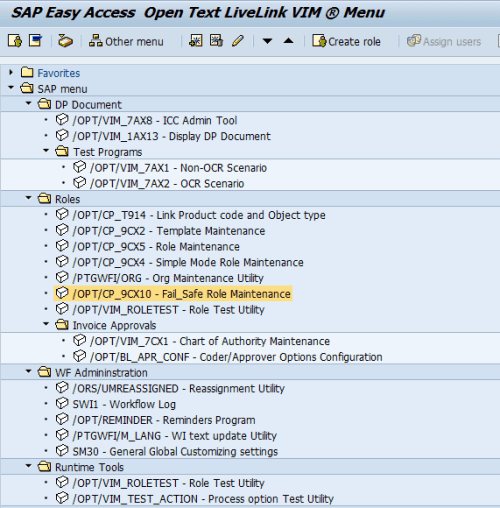
SAP VIM Menu for OpenText can be launched by going to transaction area and set /N/OPT/VIM


The SAP VIM Menu will displayed like following and classified by Topics and Subtopics.

Check the Check more information on OpenText Suite for SAP?

