
SAP stock Overview covers all related subjects for SAP Materiel Stock in MM.
It starts with how to check Material Stock.
Then comes ?the important SAP Tcodes for handing Stocks in SAP MM/SD (Material Management / Sales and Distribution ) and SAP WM ( Warehouse Management ).
The next part will introduce the different SAP Stock Types .
The last section lists the the most important BAPI when dealing with SAP Stock.?
Display SAP Stock Overview for a material
You can directly check the stock on a SAP Material.
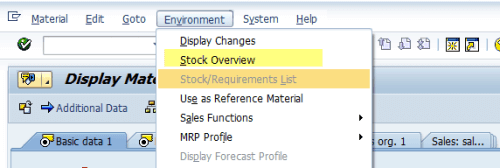
To do, Go to Material (MM03) and go to?Environment > Stock Overview

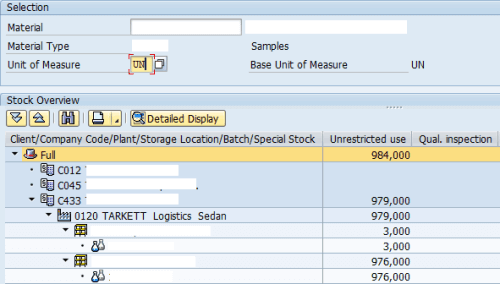
The stock will be displayed by:
- Unit of Measure: the default Unit of Measure for the SAP Material ( MARA-MEINS )
- Company Code
- Plant : MARD-WERKS
- Storage location: MARD-LGORT
- SAP Stock Type

SAP Stock Tcodes
Use the transaction MMBE to get overview of SAP Stock for a particular material and access the previous screen.
To sum up, the most important Tcodes for displaying stocks in SAP MM

[table tablesorter=”o” class=”table table-border” id=”SAP Batch Management Tcodes”]
SAP Stock Tcodes, Description
MB51,Material Doc. List
MB52, List of Warehouse Stocks on Hand
MB53, Display Plant Stock Availability
MB54, Consignment Stocks
MB55, Display Quantity String
MB56, Analyze batch where-used list
MB57, Compile Batch Where-Used List
MB58, Consgmt and Ret. Packag. at Customer
MB59, Material Doc. List
MB5A, Evaluate Batch Where-Used Archive
MB5B, Stocks for Posting Date
MB5C, Pick-Up List
MB5D, Delete Docs of Batch Where-Used File
MB5E, Create Batch Where-Used Archive
MB5K, Stock Consistency Check
MB5L, List of Stock Values: Balances
MB5M, BBD/Prod. Date
MB5OA, Display Valuated GR Blocked Stock
MB5S, Display List of GR/IR Balances
MB5T, Stock in transit CC
MB5TD, Stock in Transit on Key Date
MB5U, Analyze Conversion Differences
MB5V, Manage Batch Where-Used Archive
MB5W, List of Stock Values
MMB1, Create Semifinished Product
MMBE, Stock Overview
[/table]
SAP WM Stock Transactions
On SAP WM

[table tablesorter=”o” class=”table table-border” id=”SAP WM Stock Tcodes”]
SAP WMStock Tcodes, Description
LS24,Display Quants for Material
LS25,Display Quants per Storage Bin
LS26, Warehouse stocks per material
LS27, Display quants for storage unit
LS28, Display storage units / bin
LX02, Stock list
[/table]
SAP Stocks Types
There is 2?types of stocks: Normal stocks and special stocks.
SAP Normal Stocks
For Normal Stocks :
- UR,
- Quality,
- blocked
SAP Special Stocks
Special stocks are stocks that are managed separately as a result of their not belonging to your company or being stored at a particular location
Special stocks and special procurement types are divided into the following areas:
- Consignment
- Subcontracting
- Stock transfer using stock transport order
- Third-party processing
- Returnable transport packaging
- Pipeline handling
- Sales order stock
- Project stock
SAP Stock Tables
Check this post for SAP?SAP Stocks Tables and Types
You will find the above link:
SAP Stock BAPI
Find here some relevant BAPI to retrieve a material Stock in SAP.
The first SAP STock BAPI we will detail is?MARD_SINGLE_READ to read stock line.
The next one is?MB_READ_MATERIAL_STOCKS.
MARD_SINGLE_READ
The BAPI MARD_SINGLE_READ read the table MARD where the sum of stock is stored.
The field for free stock ?(available stock) is MARD-LABST.
MB_READ_MATERIAL_STOCKS
The SAP Stock BAPI MB_READ_MATERIAL_STOCKS is used to read Stock in detail for a SAP material.
Note that data can retrieve directly from tables/fields:?TRTYP, XNEUP, XAENP, MBEQU, SHKZG, XENQU, KZDZV, XMBWL, MBVAL, XWERT
CALL FUNCTION 'MB_READ_MATERIAL_STOCKS' "
  EXPORTING
    mtcom =                     " mtcom
    trtyp =                     " t158-trtyp
    xneup =                     " t063f-xneup
    xaenp =                     " t063f-xaenp
    mbequ =                     " tcurm-mbequ
    shkzg =                     " mseg-shkzg
    xenqu =                     " c
    kzdzv =                     " tcuch-kzdzv
    mkpf =                      " mkpf
    xmbwl =                     " c
  IMPORTING
    mbefu =                     " mbefu
    mtcor =                     " mtcor
    mtper =                     " mtper
  TABLES
    x156m =                     " t156m
    x156w =                     " t156w
    xstru =                     " wsos_stuli
    xmchb =                     " smchb
  CHANGING
    dm07m =                     " dm07m
    vm07m =                     " vm07m
    mseg =                      " mseg
  EXCEPTIONS
    LOCK_ON_BATCH = 1           "
    .  "
SAP Stock Movement BAPI
Check here the List of important SAP Good Movement BAPI (Create,Cancel and Getdetails) in the following link:?List of important SAP Good Movement BAPI (Create,Cancel & Getdetails).
To sum up,?BAPI_GOODSMVT_CREATE?is used to create Good Movement Document.
The BAPIs?BAPI_GOODSMVT_GETDETAIL?and?BAPI_GOODSMVT_GETITEMS?will get the detail of the SAP Good Movement Document.
You will find also an useful tip on how?Create a Material Document with Equipment ( Serial number ).

