
How to zip a file using ABAP: The easy why it to use the standard class CL_ABAP_ZIP.
You will find following a ready to run program taking a file in input and converting it into Zip file in the Presentation server.
How to zip a file using ABAP ?
The different step to zip a file using ABAP is
- Uploading the file into memory
- Convert Binary to XString
- Create an instance of cl_abap_zip
- Add Binary File to
- Get ZIP File in Binary mode
- Convert XSTRING to String
- Download ZIP file on Presentation server
ABAP Program to Zip a file using ABAP
The output screen will look like :
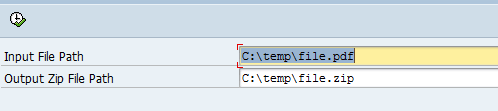
And the result is:

The first Step is to upload the file and to convert it to XSTRING format.
Learn more about Conversion ABAP: between Binary, String, XString and Table
DATA: lr_abap_zip   TYPE REF TO cl_abap_zip.
DATA: lt_data_tab   TYPE TABLE OF x255,
      lv_bin_size   TYPE i,
      lv_bufferx    TYPE xstring,
      lv_buffer_zip TYPE xstring.

" Input File
PARAMETERS: p_ifile TYPE string  DEFAULT 'C:tempfile.pdf'.
" Output File
PARAMETERS: p_ofile TYPE string  DEFAULT 'C:tempfile.zip'.


START-OF-SELECTION.

  " Upload file
  CLEAR: lt_data_tab[],lv_bin_size.
  CALL FUNCTION 'GUI_UPLOAD'
    EXPORTING
      filename   = p_ifile
      filetype   = 'BIN'
    IMPORTING
      filelength = lv_bin_size
    TABLES
      data_tab   = lt_data_tab.

  " Convert Binary to XString
  CALL FUNCTION 'SCMS_BINARY_TO_XSTRING'
    EXPORTING
      input_length = lv_bin_size
    IMPORTING
      buffer       = lv_bufferx
    TABLES
      binary_tab   = lt_data_tab.
  IF sy-subrc <> 0.
    MESSAGE ID sy-msgid TYPE sy-msgty NUMBER sy-msgno
            WITH sy-msgv1 sy-msgv2 sy-msgv3 sy-msgv4.
  ENDIF.
The second step is to create a new Zip file using CL_ABAP_ZIP->ADD method, then to save the Zip file.
  " Create an instance of cl_abap_zip
  CREATE OBJECT lr_abap_zip.

  " Add Binary File to
  CALL METHOD lr_abap_zip->add
    EXPORTING
      name    = p_ifile
      content = lv_bufferx.

  " Get ZIP File in Binary mode
  CALL METHOD lr_abap_zip->save
    RECEIVING
      zip = lv_buffer_zip.

  CLEAR: lt_data_tab[],lv_bin_size.

  " Convert XSTRING to String
  CALL FUNCTION 'SCMS_XSTRING_TO_BINARY'
    EXPORTING
      buffer        = lv_buffer_zip
    IMPORTING
      output_length = lv_bin_size
    TABLES
      binary_tab    = lt_data_tab.

  " Download ZIP file on Presentation server
  CALL FUNCTION 'GUI_DOWNLOAD'
    EXPORTING
      bin_filesize = lv_bin_size
      filename     = p_ofile
      filetype     = 'BIN'
    TABLES
      data_tab     = lt_data_tab.
ZIP file in ABAP with GZIP
An other ways to How to zip a file using ABAP is using GZIP/GUNZIP compression and decompression algorithm.
But if you want to go the hard way, you can implement your own GZIP/GUNZIP compress.
The advantage of GZIP/GUNZIP:
- Independent of CPU type, operation system …
- Works also on Data stream
- Efficiency compress method
Go and play with this GZIP/GUNZIP custom ABAP in this link
Other Methods ?CL_ABAP_ZIP Class
The standard Class CL_ABAP_ZIP is the perfect fit to handle ZIP File using ABAP code.
In the previous example, we mostly used the methods ADD and SAVE.
Here the list of CL_ABAP_ZIP Methods:
[table tablesorter=”o” class=”table table-border”]
ZIP Method, Description
LOAD, Loads a Zip File
SAVE, Creates a Zip File
GET, Reads a File from the Zip Folder
ADD, Adds a File to a Zip Folder
DELETE, Deletes a File in the Zip Folder
CRC32, Calculate a CRC32 Value
SPLICE, Loads and Splits a Zip File
[/table]
Other utility class for GZIP CL_ABAP_GZIP
CL_ABAP_GZIP Class for (De)Compression (GZIP) is other alternative if you want to use rather GZIP compression.
Here the list of the methods of CL_ABAP_GZIP are:
[table tablesorter=”o” class=”table table-border”]
GZIP Method, Description
COMPRESS_TEXT, Compression of Text in GZIP Format
DECOMPRESS_TEXT, Decompression of Zipped Text
COMPRESS_BINARY, Compression of Binary Data in GZIP Format
DECOMPRESS_BINARY,Decompression of Zipped Binary Data
[/table]