
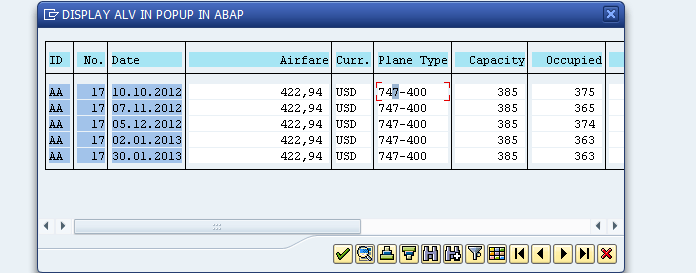
The easiest way to display an ALV in PopUp is to use the standard function module REUSE_ALV_POPUP_TO_SELECT. The ALV can be editable also, so the ALV will help for example to select lines without a set of lines.
ALV in PopUp with REUSE_ALV_POPUP_TO_SELECT
Dealing with PopUp in SAp, you may also want to check
- ABAP PopUp: Types and Samples codes
- Display Popup Window in WebDynpro Abap
- Step by Step Guide how to Debug Popup Screen in SAP ABAP
REUSE_ALV_POPUP_TO_SELECT:?List in dialog box to choose one or more entries (or display only)ABAP samples programs for ALV in Popup.
Importing
- I_TITLE: Dialog box title
- I_SELECTION: (X) = Selection possible, ( ) = Display
- I_ALLOW_NO_SELECTION: Allow copy although nothing is selected
- I_ZEBRA: Line output with alternating color
- I_SCREEN_START_COLUMN: Coordinates for list in dialog box
- I_SCREEN_START_LINE: Coordinates for list in dialog box
- I_SCREEN_END_COLUMN: Coordinates for list in dialog box
- I_SCREEN_END_LINE: Coordinates for list in dialog box
- I_CHECKBOX_FIELDNAME: Output table checkbox field name
- I_LINEMARK_FIELDNAME: Line selection color information field name
- I_SCROLL_TO_SEL_LINE: Scroll to default selection if necessary
- I_TABNAME: Table name with chosen values
- I_STRUCTURE_NAME: Internal output table structure name
- IT_FIELDCAT: Field catalog with field descriptions
- IT_EXCLUDING: Table of inactive function codes
- I_CALLBACK_PROGRAM: Name of the calling program
- I_CALLBACK_USER_COMMAND: USER_COMMAND handling form routine name
- IS_PRIVATE: Internal private use only
Exporting
Two parameters are available for export.
The first one is ES_SELFIELD and contains the ?selection info for simple selection.
The second field is E_EXIT. This field is set to ?’X’ when the action is Cancel by user.
Tables
The Table T_OUTTAB will contain the selection values to be displayed in the ALV in Popup.
ALV in PopUp ABAP sample
Here a sample ALV in Popup with ABAP to display a list of SFLIGHT.
type-pools: slis.
data: gt_outtab type sflight occurs 0,
      gs_private type slis_data_caller_exit,
      gs_selfield type slis_selfield,
      gt_fieldcat type slis_t_fieldcat_alv with header line,
      g_exit(1) type c.

parameters: p_title type sy-title.
*
start-of-selection.
  select * from sflight into table gt_outtab up to 5 rows.

  call function 'REUSE_ALV_FIELDCATALOG_MERGE'
       exporting
            i_structure_name       = 'SFLIGHT'
       changing
            ct_fieldcat            =  gt_fieldcat[].

  read table gt_fieldcat with key fieldname = 'PLANETYPE'.
  if sy-subrc = 0.
    gt_fieldcat-no_out = 'X'.
    modify gt_fieldcat index sy-tabix.
  endif.

  call function 'REUSE_ALV_POPUP_TO_SELECT'
       exporting
            i_title                 = p_title
*           I_SELECTION             = 'X'
*           I_ZEBRA                 = ' '
*           I_SCREEN_START_COLUMN   = 0
*           I_SCREEN_START_LINE     = 0
*           I_SCREEN_END_COLUMN     = 0
*           I_SCREEN_END_LINE       = 0
*           I_CHECKBOX_FIELDNAME    =
*           I_LINEMARK_FIELDNAME    =
*           I_SCROLL_TO_SEL_LINE    = 'X'
            i_tabname               = '1'
            it_fieldcat             = gt_fieldcat[]
*           IT_EXCLUDING            =
*           I_CALLBACK_PROGRAM      =
*           I_CALLBACK_USER_COMMAND =
            is_private              = gs_private
     importing
            es_selfield             = gs_selfield
            e_exit                  = g_exit
       tables
            t_outtab                = gt_outtab
       exceptions
            program_error           = 1
            others                  = 2.
  if sy-subrc <> 0.
    message i000(0k) with sy-subrc.
  endif.
  write: / g_exit,
           gs_selfield-tabname,
           gs_selfield-tabindex,
You can also check the demo SAP ABAP Demo Programs to show the use of REUSE_ALV_POPUP_TO_SELECT.
- BALV_POPUP_TO_SELECT : Test program REUSE_ALV_POPUP_TO_SELECT
- BALV_POPUP_TO_SELECT_2 : Test program REUSE_ALV_POPUP_TO_SELECT